


A smart parking assistant for everybody
Project duration: February 2023 - March 2022
Responsibilities: UX designer, researcher, wireframing, low fidelity and high fidelity prototyping, usability studies
Project Vision
This was a design assignment to practice responsive design for different screen sizes for the certificate program again. My challenge was to design an application for social good with a theme that we would choose.
As a resident one of the most crowded neighborhoods of Istanbul I always had a problem to find a parking place for my car. After a long day, when I turn back to my neighborhood I remember driving extra time, sometimes extending up to 30-40 minutes to find a proper place to leave my car and go home. So I decided to focus on developing an application which will help the driver find an empty lot nearest to them and direct the driver there immediately while not showing that place as available to other drivers. A kind of a control tower for the neighborhoods.
With the help of the application the drivers would gain more time, drive less and spend less resources. It would be both time saving and sustainable and environmental if we had an application like this.
Kickoff
&
User Research
Pain Points:
1. It is always time consuming to find a parking space in crowded neighborhoods.
2. While you drive around you don't see which lots are being left idle and until you reach there someone else might park.
3. You spend more gasoline and create more fumes for air contamination.
The Users

Mesut SOYLU
46
MBA
Manager in an e-commerce business
Istanbul
Married with 2 kids
After work Mesut comes back home but he needs to find a proper parking space for his car. There are not many parking facilities in the neighborhoods and he has to leave the car on the street. Because of that he needs to drive around the blocks for long periods to find a place but he wants to arrive home early after the work and spend more time with the family.

Ashley LOGAN
35
Masters degree on education
English teacher
Istanbul
Single
Ashley spends a lot of time with her students at the school and she has private online tutoring students after the school time. She needs to arrive home early and get some rest before she starts the online classes at home. However she lives in a central neighborhood and it is not easy to find a parking place. She spends a lot of time finding one and sometimes she just jumps into online classes as soon as she arrives home because of that.

İsmet MİRKELAM
30
University degree
Developer
Istanbul
Single
İsmet is a web developer and he works in a corporate company. It is easy for him to park his car in work plaza but in his neighborhood, like every neighborhood in Istanbul, there are not many disabled parking lots. Also in the city when he goes to other places, since he doesn’t know those neighborhoods, it is not easy to find the parking lots’ locations.
User Journey Map
I worked on the user journeys and studied the common necessary steps that a user needs to go through finding the parking place. Common actions that a driver makes are defined and what actions needed to be included in the app is found out after this step.


Competitive Audit
An audit of a few competitors’ products provided direction on opportunities to adress in the app. I made a search to find a similar app however I couldn't find a direct competition. Most of them are focused on closed carparks only or paid ones. However auditing them also gave me quite an extensive idea set.

Ideation
I made a quick ideation process with the "Crazy 8's Method" to identify what functions might be on the main screen of the application to help users. My focus was mostly on finding a space and navigating there.

Digital Wireframes
I created the initial designs or the parking assistant app in a digital wireframe. The designs were focused on helping the users to find the nearest parking space.

More Screens of Wireframes


Usability Study
After the usability findings analyzed, the necessary changes are implemented and the design process is concluded.
Findings
1. People wanted to have an emergency call button
2. Some users wanted a more clear back button in the settings flow.
3. People liked app showing 3 options only but wanted me to add a search again button.
Depending on those findings I proceeded to the design phase and added those elements in my mock ups as well.


Responsive Design - Desktop Version
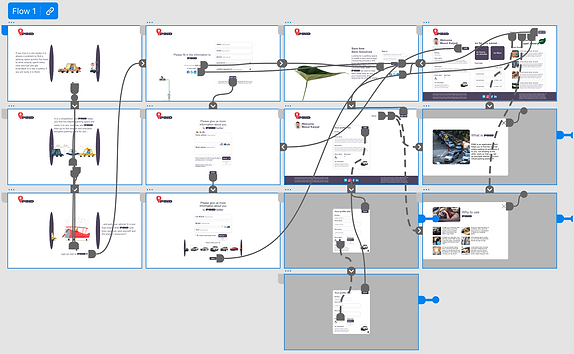
After finishing the final designs of the mobile version. I adapted the designs to a desktop version of the same network platform and the profile creation flow. In the desktop version, since the application is serving for the drivers and to be used in a car, I chose to include some dashboard items and profile information basically. It will be more information source about usage and past data. I worked on the digital wireframes first.

Final Designs &
High Fidelity Prototype
Since the desktop version would be a supporting website I wanted to keep it very simple and a source for information like profile information, usage metrics and information about sustainability and environment and some social news about the city.
I explored overlay structures more in this version to make all even more simple.


Takeaways
With this project I practiced more to design different screen sizes.
What could be done next?
I would refine the project by adding more options of membership information, and the flow for the disabled car parking displays.
OTHER PROJECTS


